Editor’s Note: This is Part 2 of our Blackthorn Boost series exploring the future of Salesforce-native event management. In Part 1, we examined why events have reached an inflection point and why a strong Salesforce event data foundation matters. Read Events at an Inflection Point: The Future of Salesforce Event Management Software
Salesforce event management software is only as powerful as the people who can actually use it. When workflows are intuitive, planners, marketers, and operations teams can launch events faster, collaborate without roadblocks, and measure outcomes directly inside Salesforce, without waiting on a technical specialist every time something needs to change.
That’s the shift happening right now. Speed, usability, and confidence are no longer differentiators. They’re the baseline. And the gap between where most teams are today and where they need to be is defining the next era of Salesforce-native event management.
We introduced this vision at Blackthorn Boost, where we shared how foundation, accessibility, and intelligence reshape modern Salesforce-native event management. Watch the full Boost recording →.
When Event Planning Feels Like Configuring Software
Somewhere along the way, enterprise event platforms started equating complexity with capability. The more powerful the tool, the more it seemed to require a specialist just to operate it day to day.
Salesforce reflects this tension. It’s one of the most powerful systems of record organizations run on, but its depth can make everyday tasks feel more like system configuration than event planning. That’s not a flaw, it’s the foundation. The opportunity is improving the experience built on top of it.
Most planners don’t think in fields and objects. They think in attendee journeys, event moments, and business outcomes. But too often, the tools they use reflect the system’s logic rather than their own workflow. A planner logs in to launch an event and encounters layered menus, disconnected settings, and decisions that don’t map to what they’re actually trying to do.
The friction shows up quietly: an extra hour tracking down the right setting, hesitation before adjusting a workflow because the downstream impact isn’t clear, or a dependency on a Salesforce admin for what should be a five-minute task. Over time, that friction adds up.
Teams repeat last year’s event format because it feels safer than navigating an unfamiliar configuration. They design processes around platform limitations rather than the attendee experience. According to Freeman’s Event Organizer Trends research, 73% of event programs remain largely unchanged despite a workforce and attendee base that has fundamentally shifted.
That’s not a content problem or a creativity problem. It’s an infrastructure problem — and it costs programs their momentum.In our Event Planning Trends Report, we explore how operational drag slows innovation and what modern teams are doing to eliminate it. Download the report →
Configurability without accessibility is a ceiling, not a foundation
For years, configurability was treated as the primary measure of enterprise readiness. Deep customization, complex data models, flexible campaign structures — these still matter. But configurability alone doesn’t determine whether a program can scale.
Here’s the distinction that matters: configurability is what your platform can do. Accessibility is what determines how many people on your team can actually do it.
The next generation of Salesforce event management software preserves deep customization while reducing the cognitive load required to use it. Salesforce remains the engine. The experience layered on top needs to evolve so that more teams — not just power admins — can operate confidently within it.
In Part 1 of this series, we covered why native Salesforce event data, not surface-level syncing, creates the architectural foundation modern programs require. That foundation is what makes accessibility possible. Without it, you’re not really building on Salesforce; you’re building next to it. Read Part 1 →
Modern systems organize complexity intelligently. They surface the right decisions at the right time and guide users through structured workflows instead of presenting every possible option at once.
Specialist dependency is the bottleneck most programs don’t talk about
Events now span every industry and every part of the organization, from pipeline and partnerships to donor engagement, enrollment, and long-term retention. Ownership has distributed. And distributed ownership exposes a real vulnerability: when only one or two people can confidently configure and manage events in Salesforce, programs stall.
Forrester’s State of B2B Events research found that only 20% of organizations have fully integrated their event platform into their sales and marketing stack. The other 80% are still reconciling systems and data manually, often because the tools are too complex for anyone outside of IT to operate independently.
Scale, in this context, isn’t just about volume. It’s about how many people can successfully launch and manage events without friction, and how quickly a new event can go from idea to live registration page. When more stakeholders can participate, portfolios grow without growing operational drag.
Usability isn’t a nice-to-have. It determines whether event programs scale or plateau.
Three shifts defining the future of Salesforce-native event management
With the right foundation in place, the question shifts from whether events can live in Salesforce to how they should operate. Here’s what that looks like in practice.
1. Accessibility at Scale
Running events should feel intuitive without sacrificing capability. When execution doesn’t require deep Salesforce fluency, more people can participate — and programs can grow across teams and formats without adding complexity or headcount.
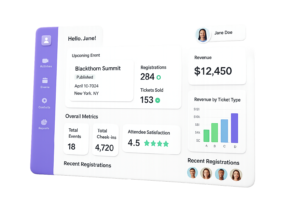
This means planners can launch events. Marketers can update registration pages. Operations teams can pull reports. No ticket to IT required.
2. Intelligence in Motion
Salesforce provides the data foundation. What teams need on top of that is insight at the moment decisions still matter, not three weeks after the event closes.
That means being able to answer questions like:
- What engagement drives outcomes?
- Which registrants are most likely to convert or take the next step?
- Where does follow-up create the most impact?
- How are events influencing broader goals like pipeline or donor growth?
When event engagement data lives natively inside Salesforce, reporting becomes immediate. There are no exports, no reconciliation, no waiting. Activity connects directly to outcomes — and insight becomes actionable.
If engagement cannot connect to outcomes, it remains anecdotal. Intelligence turns activity into impact.We demonstrate how this works in practice in our Boost keynote, including how real-time event performance tracking inside Salesforce shifts reporting from reactive to proactive. Watch the recording →
3. Impact That Compounds
Accessibility removes bottlenecks and intelligence removes guesswork. Together, they turn events from isolated campaign moments into connected experiences that influence revenue, enrollment, donor growth, and long-term retention — and prove it.
The U.S. events market reached roughly $285 billion in 2024, and according to the 14th Annual Global Meetings and Events Forecast from Amex GBT, 66% of organizations expected meeting and event budgets to grow in 2025, and 74% remain optimistic about the industry’s health. As investment increases, expectations increase with it. That level of commitment demands infrastructure built to measure real business impact, not just registrations.
Traditional Event Platforms vs Salesforce-Native Event Management
Wondering about the benefits of an integration vs. a Salesforce-native platform? Read our blog that outlines the details – the difference becomes clear when you look at how each approach handles data, workflows, and outcomes.
| Traditional event platforms | Salesforce-native event management | |
|---|---|---|
| Where event data lives | Synced after events, often with gaps | Lives directly inside Salesforce from the start |
| Reporting | Happens in separate tools, requiring exports | Happens inside Salesforce, in real time |
| Who can run events | Typically requires a specialist to configure | Guided workflows allow more team members to operate independently |
| Attribution | Manual reconciliation after the fact | Connected to pipeline, revenue, or donor activity automatically |
The Future of Event Management Is Invisible Infrastructure
The next era of Salesforce-native event management won’t be won by feature checklists. It’ll be won by platforms that deliver clarity — where the technology organizes complexity in the background and execution feels like momentum, not configuration.
The platforms that lead will:
- Keep event data natively inside Salesforce
- Adapt to each organization’s CRM architecture
- Preserve deep configurability for teams that need it
- Guide planners through structured, intuitive workflows
- Enable broader participation without adding operational drag
- Support real-time event management ROI measurement
This is what we mean by invisible infrastructure. Salesforce stays the engine. The experience built on top of it becomes something anyone on the team can use confidently — not just the one person who’s been doing it for three years.
This vision of invisible infrastructure, where Salesforce remains the engine and execution feels intuitive, was central to our Boost announcement. Explore the full event on-demand here →
What This Means for Event Leaders on Salesforce
If Salesforce is your system of record, these are the questions worth asking right now:
- Is your event data truly native to Salesforce, or just connected to it?
- Can more than one person on your team confidently run events?
- Are you getting insight while decisions still matter, or after it’s too late to act?
- Are you measuring real outcomes, or just tracking registrations?
Organizations that extract the most from their events treat them as infrastructure: built on connected data, designed for scale, and measured with clarity.
If you’re exploring how to modernize your Salesforce event management strategy, start with Part 1 of this series. Our Event Planning Trends Report also covers how modern teams reduce operational drag and scale performance across formats.
At Blackthorn Boost, we shared our vision for how foundation, accessibility, and intelligence come together in practice — and what the next chapter of Salesforce-native event management looks like.
Watch the full event on demand →
Frequently Asked Questions
Salesforce-native event management software lets organizations plan, manage, and measure events directly inside the Salesforce platform. Because event data lives inside Salesforce from the start, teams can track registrations, engagement, and outcomes without syncing data from external systems.
Usability matters because events now involve multiple teams across the organization. When event workflows are intuitive, planners, marketers, and operations teams can manage events inside Salesforce without depending on technical specialists. This means programs can grow without adding bottlenecks.
A Salesforce-native event management platform operates directly inside the Salesforce environment. A connected platform lives outside Salesforce and syncs data across. With a native approach, attendee activity, engagement data, and event outcomes appear immediately within the Salesforce data model with no reconciliation required.
When event data lives inside Salesforce, organizations can connect attendee engagement directly to pipeline, revenue, enrollment, or donor outcomes. This makes it possible to measure real event ROI, not just registration counts or attendance numbers.
Yes. Modern Salesforce event management platforms include guided workflows that allow planners and marketers to launch and manage events without deep Salesforce configuration knowledge, while still preserving enterprise-level customization for teams that need it.
See how 350+ Salesforce teams run events
Feeling boxed in by your current event tools? Not quite ready for a one-on-one?
Watch our Essentials demo to see how teams are ditching disconnected tools and running every part of their events directly in Salesforce.